

It’s a new dawn
It’s a new day
It’s a new tablet for me

1 October 2026
Get the latest issue of Outlook Business

And I’m feeling good
I’m singing this song (with one or two words changed) over and over again as I begin writing this review on the very device itself. The Xiaomi Pad 7 (the nano-texture display variant) was one of my favourite products of 2025. For 2026, Xiaomi has once again proven its mettle with a mighty upgrade. Yes, we’re super early into the year, but the Pad 8 from Xiaomi is already a contender for the product of the year, and I don’t say that lightly.
Xiaomi isn’t reinventing the wheel here. Instead, the company is taking an already good product, refining it in key areas, and turning it into an even better product.
Let me tell you why I’ve been singing the praises (to everyone I’ve talked to) of this Android tablet over the last few weeks.
Superb value-for-money Android tablet
You’ll struggle to find a better-value tablet on the market today. In India, the Pad 8 starts at just Rs 33,999. With this variant, you get 8GB of RAM and 128GB of storage. The 12GB + 256GB variant retails for Rs 36,999. Finally, there is a 12GB + 256GB variant that comes with the superb Nano Texture Display. That model is selling for Rs 38,999.
Advertisement
Android tablets clearly have an advantage over the iPads of the world in the value department. Xiaomi takes that one step further and packs in a whole lot of tech for something that is quite aggressively priced.
A slim and powerful tablet
The Pad 8 is slimmer and lighter, but doesn’t break the mould. Yes, you’d be hard-pressed to find any differences in design language between the Pad 7 and Pad 8. There are centimetres' difference, but overall it's just the same. The slim bezels, the flat frames and the rounded corners. All the same. It comes in at 5,88mm thick, marginally more than an iPad Pro.
Advertisement
The tablet comes with a metal unibody, which is refreshing in a sea of polycarbonate plastic. Only two colour options are available, which is the only disappointment. You can get the tablet in either Graphite Grey or Titanium Blue. I have the Graphite Grey unit, and there have hardly been any smudges/scratches during my review period.

With a sturdy build, the only thing I would have liked is an IP rating. But foregoing one is just a way to keep the costs down. A trade-off you can’t be upset with, especially since you aren’t going to be taking this tablet into a swimming pool!
Lastly, I would have liked the power button to double as a fingerprint scanner, like on last year's Pad 7 Pro (which also didn’t launch in India). This is just something we’d all appreciate, and definitely not a dealbreaker.
What a display!
With the Pad 7, you’re still getting an 11.2-inch LCD panel. It comes with a 3200x2136 resolution and a 3:2 aspect ratio, which is useful for productivity tasks and reading. Xiaomi sells a Nano Texture Display variant (anti-glare, anti-reflective), and that’s the one I highly recommend.
The display has great colour vibrancy, and with four built-in audio drivers, it's a good device for streaming multimedia (especially sports) content. Thanks to the 144Hz refresh rate, it’s super smooth as well.
Last, but not least, I’d like to talk about the insane Reading Mode. I think Xiaomi is the only one that does this. I’m talking about the Reading Mode, in which the entire panel turns monochrome. That’s quite cool, isn’t it? It is also way better for your eyes.
Do you even need such a powerful tablet (and insane battery life)?
Yes, the Pad 8 Pro didn’t launch in India, but that doesn’t mean the Pad 8 is a slouch. It’s quite the opposite, in fact.
With Qualcomm’s Snapdragon 8s Gen 4 powering the tablet, I had no problem multitasking or streaming videos or playing casual games. I have the 12GB/256GB model with UFS 4.1 storage, and it's blazing fast for any of my daily tasks.
My workflow mostly consisted of using two apps side by side and a third one floating when needed. The best part is that it doesn’t reload your windows when you’re switching between apps.
Unless you’re a video editor, a professional gamer, or your workflow demands a laptop/workstation, the power under the hood in the Pad 8 is definitely overkill.
With a 9,200mAh cell under the hood, the Pad 8 excels at battery life. The tablet can easily get you through an entire season of your favourite TV show.
Xiaomi claims two days of usage between charges, and I can definitely see that. With a medium-to-heavy usage pattern that consisted of replying to emails, writing articles (including this one), streaming videos (so many live sports these days) and lots of researching, I was able to get a day and a half with relative ease before I had to reach for the charger.
Right now, at this cafe, all I’ve been doing is having two tabs open. One is Google Docs, and the other is Google Chrome. I started at 82%. Right now, I’m at 78%, about an hour and a half in. A 30-minute episode takes about 8 percent of battery life, which isn’t bad at all.
The Pad 8 maxes out at 45W charging (just like the Pad 7). There is a charger in the box, yes. It took me just 90 minutes to fully juice up the tablet.
The new Focus Keyboard
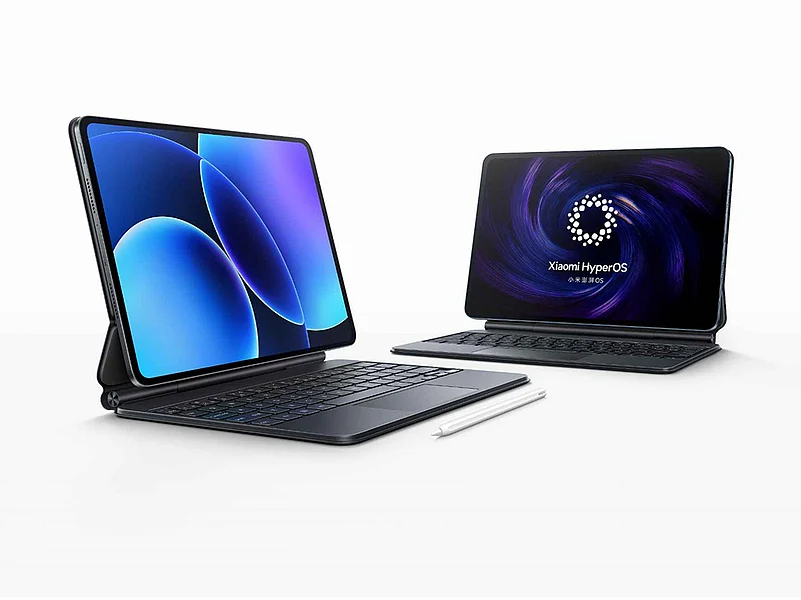
What I loved most about the Pad 8 is how it turns into a mini-computer/laptop replacement with the brand-new Focus Keyboard. The Focus Keyboard connects easily via the pogo pins on the rear panel. Typing is fast (surprisingly faster than with the Pad 7). There’s good key travel, the trackpad is smooth and very precise, and gestures are a pleasure to use. With the Focus Keyboard, the display can tilt up to about 120 degrees. There is also no fear of the tablet falling out as it is quite sturdy.
Just one little nitpick. I would have liked the keyboard to also double as a wireless one (via Bluetooth). Alas. Thankfully, though, the keys are backlit.
HyperOS 3: Thank you, Xiaomi
Unlike the Redmi Note 15 Series, the Pad 8 runs HyperOS 3 (based on Android 16) out of the box. It’s cleaner (read: bloatware-free), comes with a smoother experience, and the Material 3 Expressive-esque UI brings an upgrade we didn’t think we needed.
One new thing this time around is the Workstation mode, where the app icons appear on a dock at the bottom. Splitscreen mode was still my favourite way of using the tablet.
Cameras
They’ll suffice for video calls, but that’s about it. And I’ll just leave it there, as nobody uses tablet cameras for anything more.
Verdict: Best Android tablet to buy?
It’s an evolution rather than a revolution, and that’s fine, by all means. It’s priced well, has that insanely good Nano Texture display, and has more power than 95 percent of consumers would need. It eclipses all other Android tablets, in this price range, by a mile.
With HyperOS 3, Xiaomi is finally launching a true all-rounder. It’s got the most up-to-date OS, best-in-class battery life, and the fantastic Focus Keyboard accessory.



I would have liked an OLED rather than the LCD panel, and maybe a more tablet-esque OS (yes, even though I love HyperOS 3), but otherwise, there is really nothing I can fault the Pad 8 for. Xiaomi really has knocked it out of the park.
If you’re coming from a Pad 7, then the performance gains might not be enough to sway you. But anyone else, including users of any rival Android tablet, the Pad 8 is here to sway you and how!