

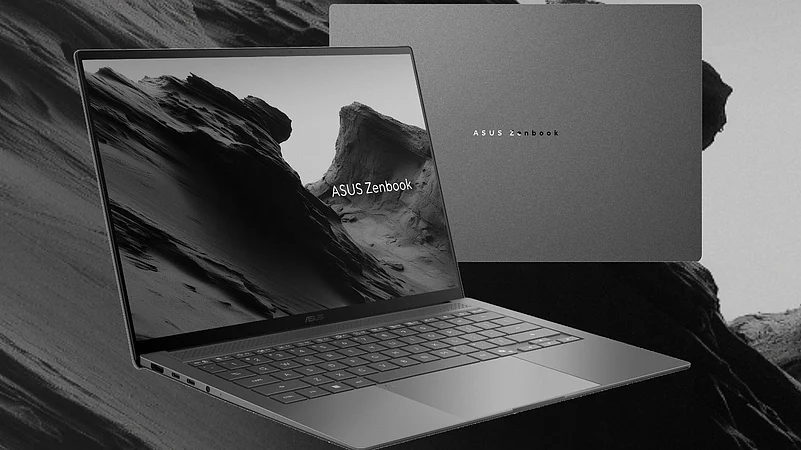
Another day, another laptop. With Asus, I’m just happy their design-first philosophy remaints in tact. Yes, the company has been experimenting with something they call “Ceraluminum” and with the 2026 edition of the Zenbook S14, it gets a nice refinement here.
Ceraluminum, according to Asus, “is a high-tech ceramic material that embodies the lightness and durability of aluminum and the anti-scratch properties of ceramic”. It’s polished, sans fingerprints and a laptop you’d love to hold and show off. It just oozes premiunness.
While the Zenbook S16 has AMD chops under the hood, the Zenbook S14 comes with Intel’s Core Ultra 9 386H. The Zenbook S14 is the more portable of the two, and I’ve come to really like it after putting it to the test.
1 September 2026
Get the latest issue of Outlook Business


The Zenbook S14 in All Its Glory
With the Zenbook S14, you get a portable, reliable, high-performance laptop with plenty of elegance to boot. It’s just a grey block, and it looks a little like you’re walking on a street. It’s got that grainy type of aesthetics to it that one just can’t help falling in love with.
The Zenbook S14 comes in at just 1.1cm thick and weighs a mere 1.2kg. It’s razor-thin, lightweight, and something you can just throw in your backpack and forget about. The CNC-machined Ceraluminum has also been put to the test. This laptop is far from fragile.
Advertisement
The Zenbook S14 doesn’t skimp on the ports. There is a USB 3.2 Gen 2 Type-A port, a 3.5mm audio jack, an HDMI 2.1 port, and two USB-C ports (Thunderbolt 4). Both the USB-C ports support charging (via the included 68W Thunderbolt adapter). Then there is support for Wi-Fi 7 and Bluetooth 6.0.

Bright OLED, Underwhelming Speakers
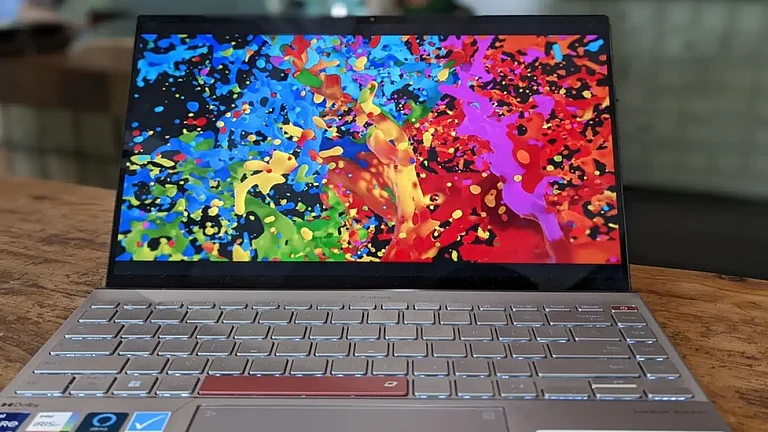
Asus has stuck with the 14-inch 3K (2880x1800) OLED panel, but one that is brighter, with more contrast and dynamic range, and also is sharper. It’s got higher peak HDR brightness (1100 nits) and a 120Hz refresh rate. With a 90% screen-to-body ratio, the display on the Zenbook S14 has truly been one of the standouts of this laptop.
Advertisement
It’s been such an experience immersing myself in sports highlights or binge-watching a show like Bait (available on Prime Video). The display has 100% DCI-PE colour coverage, deep true blacks (perfect for watching those high-end artsy movies) and you can use this laptop in any and all lighting conditions.
The only downside is that the display can attract fingerprints and needs frequent cleaning, especially if you love using it for its touchscreen capabilities.
Now, while we’re on the subject of binge-watching, let me dial in some criticism. It comes in the shape of the speakers. The Zenbook S14 features a quad Dolby Atmos speaker setup. It does get loud and can be used for podcasts or casual listening sessions. But it lacks the richness and detail of other laptop speakers I’ve reviewed recently. These speakers also lack thumping bass, which might disappoint some of you. I’d recommend hooking this laptop up to some external speakers for a better overall binge-watching experience.
Blazing Fast Performance
The Zenbook S14 comes with the brand-new Intel Panther Lake processor. It may not be the top-of-the-line chip with the Arc B390 graphics, but it is potent, nonetheless. Yes, the Core Ultra 9 386H chip may not move the needle much, but in my time testing it, it proved to be sufficient and then some, for everything I threw at it.
Apps opened in an instant, using Adobe Photoshop was a pleasant experience, and even editing 4K videos (which I just did to test the laptop) was a breeze. There was no stuttering, and the laptop didn't heat up under heavy loads. The Ceraluminum never got too hot for me to handle it. I also tried pushing the limits by running WhatsApp Beta and Google Chrome (with 200+ tabs) simultaneously while playing Counter-Strike. The laptop handled everything with aplomb.
With 32GB of LPDDR5X RAM to support the Panther Lake processor, the reviewer in me was a happy camper.

I Love Typing on the Zenbook S14
Yes, I’ve been typing out this review on this very laptop for the past thirty minutes. Let me just sum it up in one word: fantastic.
With a flat profile and low travel, your fingers just glide over the chiclet-style keys. The keys are nicely spaced, and you can easily keep up your fast typing speeds on this keyboard. There’s a slight flex, but nothing that should deter you from typing fast. It’s a tighter layout, as it’s a 14-inch laptop, but for extended work sessions, I had no problems typing and typing and typing.
The Touchpad Disappoints
The touchpad was larger than it should have been. Being a glass surface, the gestures were smooth and responsive, but it was the accidental touches that irked me the most. Sometimes, even clicking on the left side of the touchpad produced a right click. This issue isn’t unique to the Zenbook S14 (it’s happened to me on other Asus laptops also), but yeah, I don’t know why Asus hasn’t fixed it yet. Furthermore, the clicks lack that satisfying feedback.
How’s the Battery Life?
With a slightly higher 77Whr battery and a more efficient Panther Lake processor, the Zenbook S14 easily lasts a day and a half on a single charge.
The Zenbook S14 also comes with a higher-wattage 68W USB-C charging brick. You can get a 50% charge in just 40 minutes, with a full charge taking about 85 minutes.
I did run a video loop test this time around. I played a 4K video on YouTube. The video was about 12 hours long. The video played fully without any problems. The second time I played the video, the laptop shut down before the video ended. I did get to about 16-17 hours, which is mighty impressive.
You can easily leave your charger at home and take this laptop for a two-day workcation.

Verdict
The laptop may seem like a run-of-the-mill ultraportable model, but it is far from it. It’s sleek, portable (yes, just toss it in your bag and you may even forget it's there), a speedy processor (even though it hasn’t moved the needle much from last year’s equivalent chip) and one of the best OLED displays in any laptop. Ceraluminum has grown up and, in its refined version, is absolutely fantastic.
With a comfortable typing experience and extremely long battery life, the Zenbook S14 has already become my favourite laptop of 2026 (maybe the ExpertBook Ultra, that I’m currently testing, might surpass it).
There’s no haptic touchpad on the Zenbook S14, and neither is there a fingerprint sensor. The speakers and the camera (which I didn’t touch upon) are average at best. But, with that said, I’d still say the Zenbook S14 is a brilliant laptop.
There is no haptic touchpad, no fingerprint sensor and the speakers and camera are average.


If it weren’t for the pricing, the Zenbook S14 would have gotten an outright recommendation from me. Yes, I know laptop prices are higher than last year, but I wish Asus had gone a little more aggressive with the Zenbook S14. The Core Ultra 7 355 variant, which I don’t recommend, retails for ₹1,79,990. The Core Ultra 9 386H unit is selling for ₹1,99,990. The Core Ultra 9 386H variant I’m testing, with a 1TB SSD, costs a whopping ₹2,49,990.
With Computex around the corner and more laptops said to be released (including ones with Qualcomm’s Snapdragon X2 Elite chips), it may make sense to hold off just a little bit more before deciding upon a laptop. If your heart is set on an Intel Series 3 laptop and the pricing won’t bite too much for you, then the Zenbook S14 from Asus is my preferred choice. It’s a polished laptop and one that I loved reviewing.